· 8 min read
Privacy Policy generator for mobile apps
A privacy policy generator for mobile apps that drafts from your real SDKs, with ATT and permission sections. Free to draft and preview, no card needed.




Short answer: a privacy policy generator for a mobile app should draft from the SDKs and permissions your app actually uses, because Apple and Google both require a policy that matches what you collect and share. Instant Terms lets you pick your SDKs from a library of 68 tools and adds App Tracking Transparency and mobile permission sections. The result is a first draft, free to draft and preview with no card, for a qualified lawyer to review before you publish.
Why a generic privacy policy is a risk for a mobile app
Both stores treat the Privacy Policy as a submission requirement. Both also hold you responsible for what it says. A template that describes a hypothetical app can easily be wrong about yours.
Apple's Guideline 5.1.1(i) requires a privacy policy link in the App Store Connect metadata field and somewhere easy to find inside the app. Since 3 October 2018, a policy has been required for all new apps and updates, including TestFlight external testing.
Google Play's User Data policy sets a similar rule. Every app needs a privacy policy, reachable inside the app and linked in the Play Console. It must say what data you collect, how you use it and who you share it with.
Play's rules reach every SDK in the app. For example, you may not link persistent device IDs (IMEI, IMSI, SIM serial) to personal data or to resettable IDs. That applies to third-party code too.
Accuracy is also your job. Since 20 July 2022, every Play app has needed an accurate Data safety form, including apps that collect no data. Developers are responsible for what it says. If it misrepresents the app, they must fix it or face enforcement.
Your SDKs collect data whether or not you remember them. So the policy has to start from the SDK list, not from memory.
What most app privacy policy generators do, and what they leave out
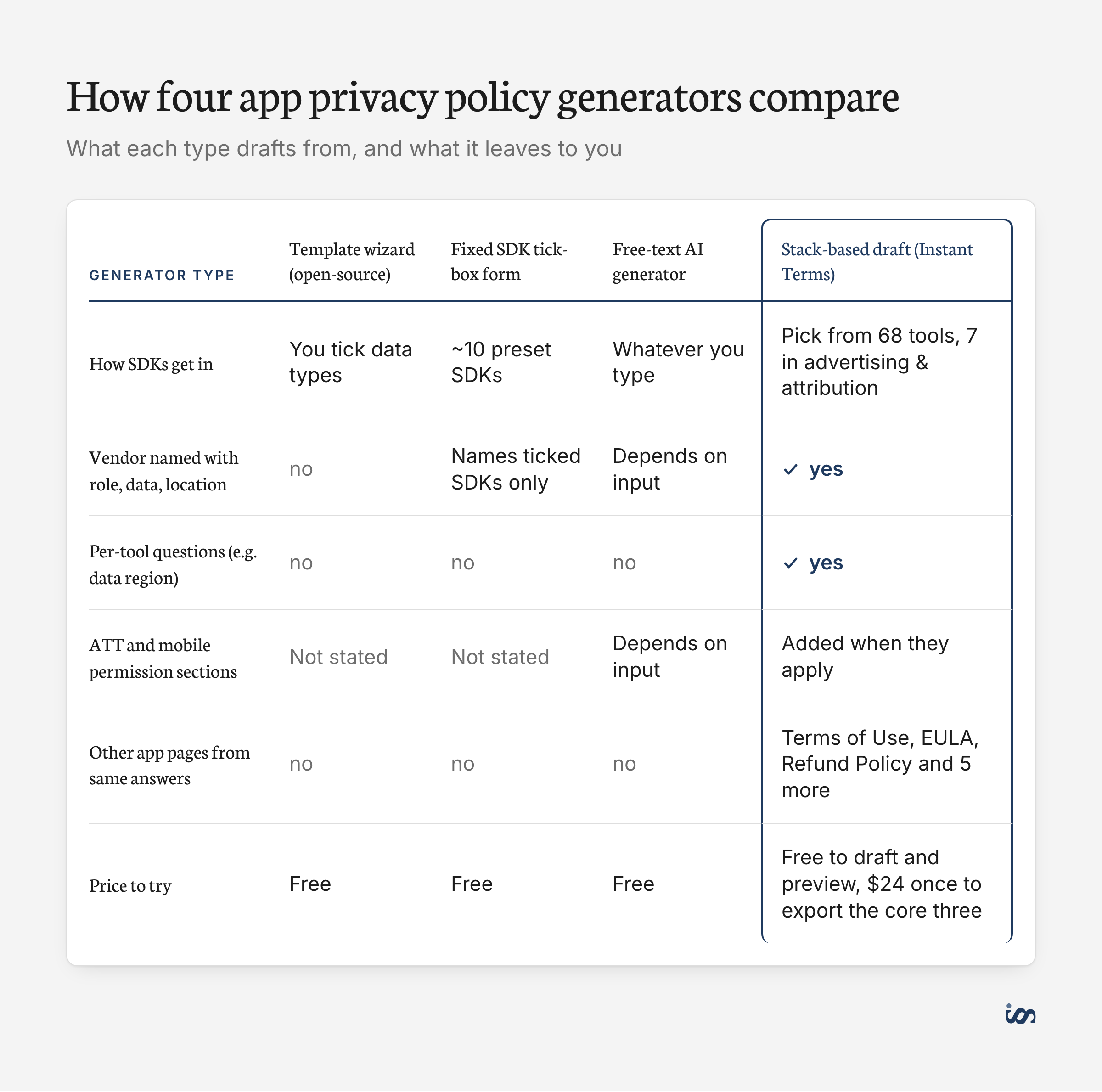
Most generators fall into four types. Each suits a different job. The difference is what each one leaves to you.
- Open-source template wizard. The GitHub app-privacy-policy-generator is free and works offline. You tick data types, pick a Simple, No Tracking or GDPR template and export HTML or Markdown. It does not explain store requirements or update when your SDKs change.
- Fixed SDK tick-box form. 8gwifi is free with no signup. It lists about 10 SDKs, such as AdMob, Firebase Analytics, Crashlytics, Facebook SDK and OneSignal. If your SDK is not on the list, it is not in the policy.
- Free-text AI generator. RapidNative writes from your description of the app. The output depends on what you remember to type. Nothing checks it against the SDKs you use.
- Website-first platforms. Termly and iubenda cover apps, but mobile is one option among several.
Other tools also draft from ticked SDKs, such as nasrtech. Instant Terms works from a library of 68 tools in 12 categories, including 7 advertising and attribution tools. Each tool brings its own clauses, data categories and links to the vendor's privacy policy and DPA.
How the Instant Terms privacy policy generator for mobile apps drafts from your SDKs
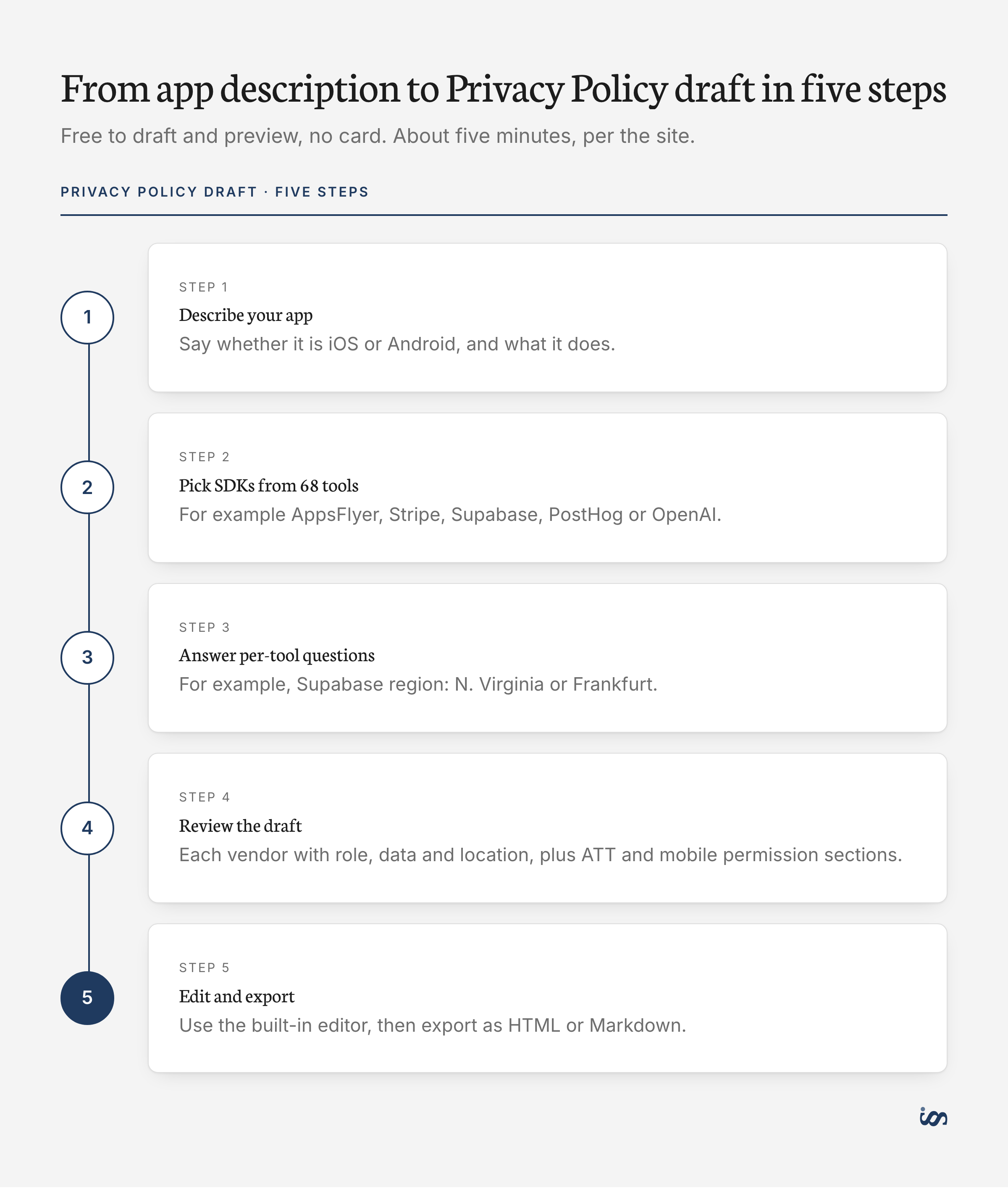
You describe the app, pick the services it runs on and answer a few questions. The draft follows from those answers. Drafting and previewing are free with no card required. The site says it takes about five minutes.
- Describe your app. Say whether it is iOS, Android or both, and what it does.
- Pick your services. Choose from the 68-tool library: AppsFlyer for attribution, Stripe for payments, Supabase for the backend, PostHog for analytics or OpenAI for AI features. Check the library for your own SDKs rather than assuming they are covered.
- Answer per-tool questions. Answers such as data regions change the wording. Supabase in N. Virginia versus Frankfurt, or PostHog on its EU cloud, changes the international transfers section.
- Review the draft. Every service provider is listed with its role, data and location. GDPR, CCPA/CPRA, App Tracking Transparency, mobile permission and AI sections are added where they apply.
- Edit and export. Use the built-in editor. The One-off plan lists HTML and Markdown, and the Privacy Policy page also mentions Word and PDF.
Vendor details are summarised from each vendor's public privacy documentation. Vendors change their terms, regions and SDK behaviour, so check the current versions before you publish.
What your app's Privacy Policy draft says about SDKs, permissions and tracking
A template says "we use third-party services". A stack-based draft names them and says what each does with your users' data. Each service provider entry has the same structure:
- The vendor's legal entity.
- Its role, such as analytics, payments or hosting.
- The data categories it handles.
- Where it processes data.
- Links to the vendor's privacy policy and DPA.
Three sections matter most for apps:
- App Tracking Transparency. This section is added when your tools involve tracking. For clause excerpts, see what to disclose about App Tracking Transparency.
- Mobile permissions. This section covers the device permissions your app requests. For wording, see example clauses for camera, location and other permissions.
- Attribution SDKs. Tools such as AppsFlyer bring ATT and CCPA/CPRA "sharing" obligations. The guide to drafting a Privacy Policy for an app with an attribution SDK covers them.
If your app shares a backend with a web product, the same tool list drives the web disclosures too. A web companion also gets a Cookie Policy that lists the real cookie names its tools set.
Before you submit: a privacy policy checklist for the App Store and Google Play
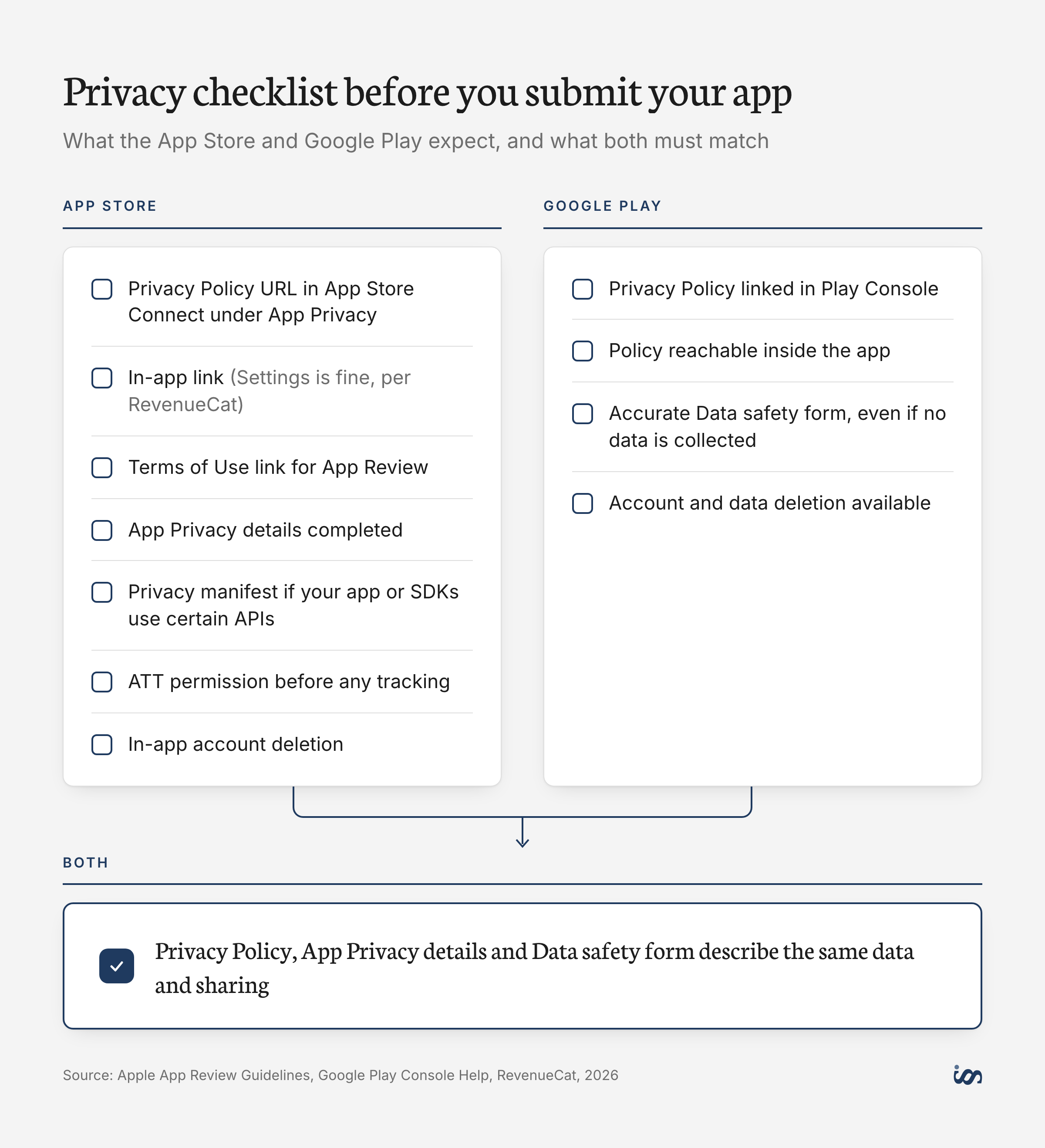
The policy is one of several things the stores check. Run through this list before you submit.
On the App Store, the policy URL goes in App Store Connect under App Privacy, according to RevenueCat. RevenueCat also says a link in Settings is enough inside the app, and that App Review wants a Terms of Use link. Apple's wider requirements include App Privacy details, a privacy manifest for apps and SDKs that use certain APIs, ATT permission before tracking and in-app account deletion.
On Google Play, link the policy in the Play Console and make it reachable inside the app. Complete an accurate Data safety form, even if you collect no data. Under the User Data policy, you must also let users delete their account and its data.
Your Privacy Policy, Apple's App Privacy details and Google's Data safety form should describe the same data and sharing. Use the draft's vendor list as your reference when you fill in the store forms. Instant Terms does not fill in the store forms for you. For the detail, read how the Data safety form and your Privacy Policy must match.
The other legal pages your app needs, from the same answers
One project produces eight documents from the same answers: Privacy Policy, Terms of Use, Cookie Policy, Data Processing Agreement (DPA), Subprocessor list, Acceptable Use Policy, Refund Policy and End User License Agreement (EULA). For the full picture, see what an iOS and Android app needs to publish.
Three matter most for app review and subscriptions:
- Terms of Use. These cover accounts, subscriptions, user content, AI output, liability and app store terms. Terms of Use, terms and conditions and terms of service are interchangeable names.
- EULA. The draft includes the terms Apple requires in a custom EULA, Google Play terms, and clauses for in-app purchases and updates. See a EULA with Apple-required and Google Play terms.
- Refund Policy. It routes in-app purchase refunds to Apple and Google. It also includes the EU and UK 14-day right of withdrawal.
When you add or swap an SDK
Adding an SDK should mean updating the policy and checking both store forms. The free generators above stop at the first draft, so the policy goes stale as the app changes.
On Pro, adding a tool or moving a data region produces suggested edits as tracked changes. Your own edits are kept. The site labels these counts as real output from a sample Pro project:
- Adding Meta Pixel gave 6 suggested edits.
- Moving Supabase to Frankfurt gave 2.
- Adding OpenAI gave 5.
Pro also includes change notices (effective dates, drafted emails to users and a changelog) and version history. Instant Terms does not claim to update documents for changes in the law.
What it costs, and what still needs a lawyer
Drafting and previewing are free with no card required. The One-off set costs $24 once per project for Privacy Policy, Terms of Use and Cookie Policy drafts. You export them as HTML or Markdown, with no subscription. Pro costs $11 per month for one project kept up to date.
Instant Terms is not a law firm. The output is a first draft, not legal advice, and it may not cover every law that applies to you. A qualified lawyer should review it before you publish. If your app is aimed at children or handles sensitive data, talk to a lawyer before relying on any generated draft.
Already have a policy? The free policy checker scores it against your tools and lists what's missing, from undisclosed tools to GDPR, CCPA and app store requirements. It allows 3 checks a month with an account.
FAQ
Does my app need a Privacy Policy if it collects no data?
In practice, yes. Apple has required a privacy policy for all new apps and updates since 3 October 2018, and Google Play requires every app to have one. Play also requires an accurate Data safety form even for apps that collect no data. Many SDKs collect data by default, so check yours.
Is this a free privacy policy generator for apps?
Drafting and previewing are free with no card, so you see the full draft first. Exporting the Privacy Policy, Terms of Use and Cookie Policy costs $24 once per project. Pro costs $11 per month and suggests edits when your tools change.
Does it work for both iOS and Android apps?
Yes. The draft adds App Tracking Transparency and mobile permission sections where they apply. The EULA draft includes Apple-required custom EULA terms and Google Play terms. Store submission steps differ, so use the checklist above.
Where do I add the Privacy Policy URL in App Store Connect?
Under App Privacy in App Store Connect, according to RevenueCat. Guideline 5.1.1(i) also requires a link inside the app. RevenueCat says a link in Settings is enough.
Will the generated policy make my app GDPR compliant?
No generator can promise that. Instant Terms adds the GDPR, CCPA/CPRA and other sections that apply to your tools. It is a first draft, Instant Terms is not a law firm, and a qualified lawyer should review it before you publish.
Do I also need Terms of Use or a EULA?
RevenueCat says App Review also wants a Terms of Use link. Whether you need a custom EULA or can use Apple's standard one depends on your app. The guide to a EULA with Apple-required and Google Play terms explains the difference. All of these documents come from the same Instant Terms project.
Your SDK list decides what your policy has to say. Start there and let the draft follow. Then check the draft against both store forms, and have a lawyer read it before it goes live.
Drafts, not legal advice
Instant Terms is not a law firm and does not give legal advice. Everything it produces is a first draft based on your answers, and it may not cover every law or situation that applies to your product. We always recommend having a qualified lawyer review your documents before you publish them. You are responsible for the documents you use.