· 8 min read
Privacy Policy Generator for SaaS, Built From Your Stack
A privacy policy generator for SaaS that drafts from the tools you use: Supabase, Stripe, PostHog. Free to draft and preview; $24 once for the core three.




Short answer: Instant Terms is a Privacy Policy generator for SaaS that drafts your policy from the tools your product actually runs on. You pick from a library of 68, such as Supabase, Stripe and PostHog, so the policy names your real vendors, their data and where they process it. Drafting and previewing are free with no card. The core three documents cost $24 once per project or $11 a month on Pro, and the output is a first draft for a qualified lawyer to review.
Why a generic Privacy Policy doesn't fit a SaaS
A Privacy Policy has to describe what you actually do with data. For a SaaS, that means naming the services that touch it and saying where they sit.
GDPR Article 13 asks for information "at the time when personal data are obtained". That includes the purposes and legal basis for processing, and the recipients or categories of recipients.
For businesses subject to the CCPA, 11 CCR §7011 asks for a "comprehensive description" of information practices. That includes the categories of personal information collected in the preceding 12 months and the categories of sources. The CCPA applies only to businesses that must comply, so check with a lawyer whether it covers you.
A typical SaaS stack sends data to hosting, email, analytics, error tracking and AI APIs. Nextrey's advice is to map the product first, then write the policy, including where servers sit.
There is also a practical trigger. Stripe, Google sign-in and ad products ask for a published privacy policy.
Templates describe a hypothetical company. They rarely name Supabase, Stripe or PostHog. Card data usually sits with the payment processor, not you, and a template rarely says so.
For the full requirements, read what a SaaS Privacy Policy has to cover.
What the Privacy Policy generator costs: free to draft, $24 once or $11 a month
Drafting and previewing are free, with no card required. You see your documents before you pay. Paying is needed to export.
- One-off set: $24 once per project. Privacy Policy, Terms of Use and Cookie Policy drafts. Edit and export as HTML or Markdown. No subscription.
- Pro: $11 per month for one project. Unlimited policy checks, suggested edits when your tools change, version history and tracked changes, change notices (effective dates, drafted emails, changelog) and optional AI wording review.
Pricing is per project, not per pageview or per document. If you are unsure which to pick, read One-off vs Pro, and when updates are worth paying for.
1. Pick the tools your product runs on
The stack drives the wording, so you start there. Describe your product, then pick services from a library of 68 tools in 12 categories. Six of those categories:
- Hosting & infrastructure: 10
- Analytics: 10
- Email: 8
- Payments: 7
- Advertising & attribution: 7
- AI models: 4
Each tool brings its own clauses, data categories, cookies and vendor legal name, plus links to the vendor's privacy policy and DPA. These details are summarised from each vendor's public privacy documentation.
Take a worked example: Supabase for the database, Stripe for payments, PostHog for product analytics and OpenAI for an AI feature. Pick those four and the Privacy Policy lists each service provider with its role, the data it handles and its location.
Vendors change their terms, regions and cookies. Check the current documents linked from each tool before you publish.
2. Answer the per-tool questions, starting with data regions
A few questions per tool decide which clauses apply. Data region changes the most.
Supabase hosted in N. Virginia produces different wording from Supabase hosted in Frankfurt. PostHog on its EU cloud produces different wording from PostHog on its US cloud. The international transfers section changes with each answer.
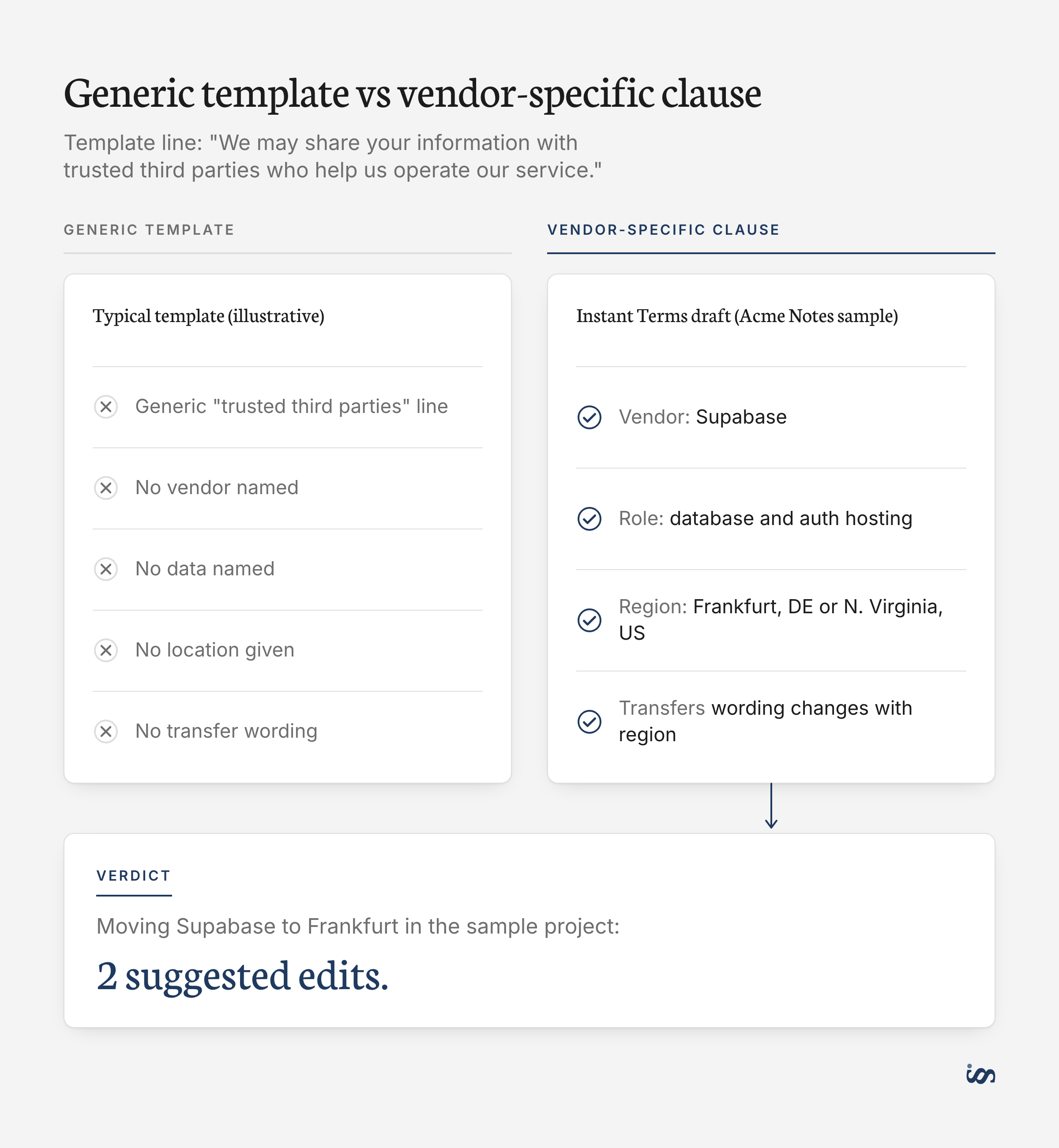
Compare that with the generic line found in many templates. This one is illustrative, not taken from a specific product:
"We may share your information with trusted third parties who help us operate our service."
It names no vendor, no data and no location. A reader cannot tell where their data goes.
The site's sample project, Acme Notes, is a fictional product, and its clauses are labelled as real output from the Instant Terms engine. In that sample Pro project, moving Supabase to Frankfurt produced 2 suggested edits.
3. Check the draft against what GDPR and the CCPA ask for
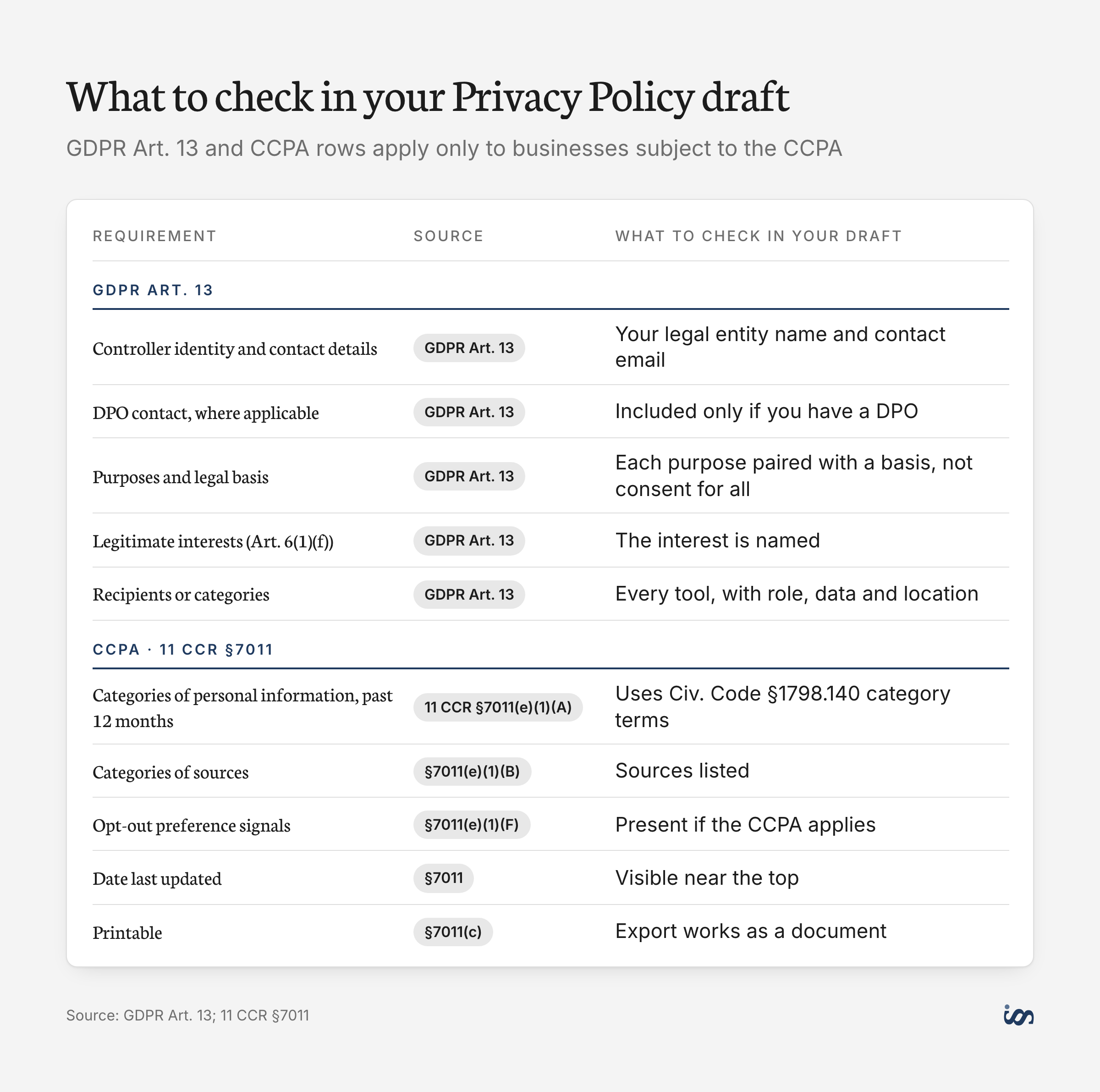
Treat the draft as something to review, not something to trust. The table maps what the law asks to where you should look in your draft.
The Privacy Policy draft adds the GDPR and CCPA/CPRA sections that apply to you. It also adds App Tracking Transparency, mobile permission and AI sections where relevant. It is a first draft. Instant Terms is not a law firm, and a qualified lawyer should review it before you publish.
Two further points matter for SaaS.
Controller versus processor. Your Privacy Policy covers data you control: accounts, billing, marketing and analytics. Content your business customers put into the product, which you handle on their behalf, belongs in a GDPR Article 28 DPA. See drafting a DPA with Annexes I-III from the same stack.
AI features. If user content goes to OpenAI or another model API, the draft adds an AI section and lists the provider. Newer CCPA rulemaking adds automated decision-making disclosures to §7011. Check the current CPPA regulations for when these take effect.
4. Edit, export and publish where the law expects it
You edit the draft in the built-in editor. The One-off plan exports HTML and Markdown. The Privacy Policy generator page also mentions Word and PDF.
Placement matters as much as wording. Under §7011(d), the policy needs a conspicuous link using the word "privacy" on the homepage, or on a mobile app's download or landing page. An app may also link from its settings menu. For a web app, the footer and the signup screen are the usual places. Under §7011(c), the policy must be printable as a document.
The steps are covered in how to create a SaaS Privacy Policy in about five minutes. The site puts drafting at about five minutes.
If you also ship an iOS or Android app, SDKs and permissions add further disclosures. See the mobile app Privacy Policy generator.
5. Keep it in step when your stack changes
Policies drift. Every new vendor is a new recipient under Art. 13. For businesses subject to the CCPA, the policy must be updated at least once every 12 months and show a last-updated date, under Civ. Code §1798.130.
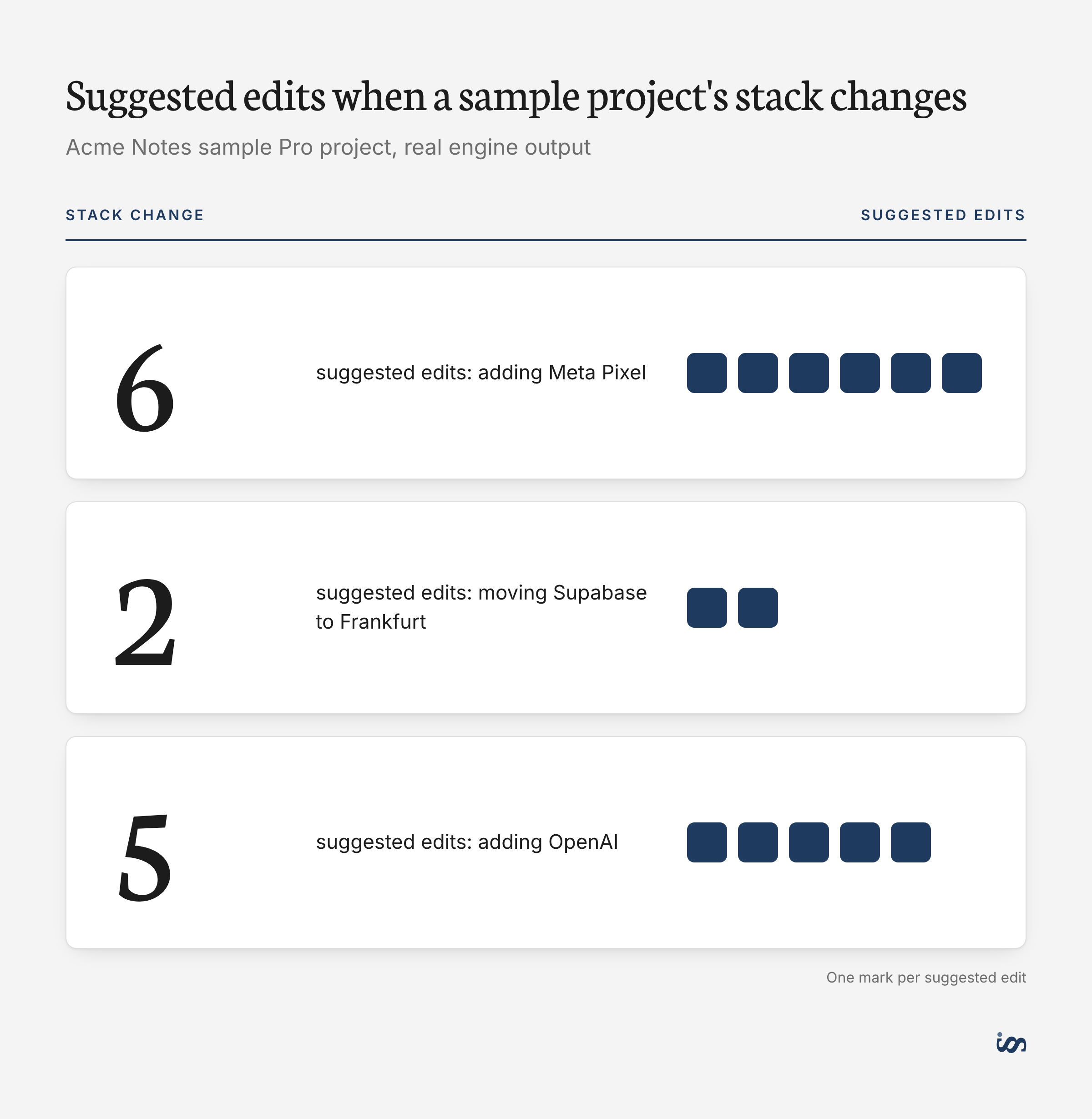
On Pro, adding a tool or moving a data region produces suggested edits as tracked changes, and your own edits are kept. In the sample Pro project, which the site labels real output, the counts were:
When your policies change, Pro also gives you effective dates, drafted emails to users and a changelog. Version history shows what changed and when.
There is a limit. Instant Terms updates drafts when your tools change. It does not claim to update them for changes in the law. Vendors also change their terms, regions and cookies, so recheck their current versions.
Claims on other Privacy Policy generator pages to treat with care
Some ranking pages repeat claims that do not hold up against primary sources.
- "SaaS providers must obtain explicit consent." Under GDPR, consent is one legal basis among several. Art. 13 asks you to state the legal basis and any legitimate interests you rely on.
- "Follow regulations like SOC 2." SOC 2 is an audit framework, not a regulation.
- "Update your policy at least once a year." That 12-month rule comes from the CCPA, not from every privacy law. Update whenever your practices or vendors change.
- "Collecting an email address always means you legally need a policy." This skips jurisdiction. The CCPA applies only to businesses that must comply. Ask a lawyer what applies to you.
Already have a Privacy Policy? Run the free check first
If you already published a template, check it before replacing it. Upload your current Privacy Policy, Terms of Use or Cookie Policy as a PDF, Word file or pasted text, and pick your tools.
You get a score and a list of what is missing, from undisclosed tools to GDPR, CCPA and app store requirements. You get 3 free checks a month with an account, and unlimited checks on Pro.
When this SaaS Privacy Policy generator fits, and when it doesn't
It fits a SaaS that runs on tools in the library and wants vendor-specific drafts of its legal pages at a flat per-project price.
The same answers produce eight document types: Privacy Policy, Terms of Use, Cookie Policy, DPA with Annexes I-III, Subprocessor list, Acceptable Use Policy, Refund Policy and End User License Agreement (EULA).
The Cookie Policy lists real cookie names and durations, such as _ga for 2 years, __stripe_mid for 1 year and intercom-session for 1 week. See a Cookie Policy that lists your real cookies.
It does not:
- provide a cookie consent banner or consent management (Termly and iubenda offer these);
- update documents for changes in the law;
- give legal advice. Instant Terms is not a law firm.
If a tool you use is missing from the library, you will need to add its disclosure by hand, so browse the library first. Treat every output as a first draft, and have a qualified lawyer review it before you publish.
A Privacy Policy is only useful if it describes the product you actually run. Start from your stack, check each vendor's current documents, and keep a lawyer in the loop before you publish.
FAQ
Is the Instant Terms Privacy Policy generator free?
Drafting and previewing are free with no card. You pay to export: $24 once per project for the Privacy Policy, Terms of Use and Cookie Policy, or $11 a month on Pro. The policy checker gives 3 free checks a month with an account.
Does my SaaS legally need a Privacy Policy?
It depends on where your users are and which laws apply. GDPR Art. 13 requires information at the time data is obtained from EU users, and the CCPA requires a policy from businesses subject to it (11 CCR §7011). In practice, Stripe, Google sign-in and app stores ask for one. A lawyer can confirm what applies to you.
Does the draft cover GDPR and CCPA/CPRA?
The draft adds GDPR and CCPA/CPRA sections that apply to your setup, plus AI, ATT and mobile permission sections where relevant. It is a first draft, not a guarantee of compliance. Use the Art. 13 and §7011 table above to review it, then have a lawyer check it.
Do I still need a lawyer?
Yes, for review. Instant Terms is not a law firm and produces first drafts. It saves your lawyer from starting on a blank page or a generic template, because vendors, data and regions are already filled in.
How often should I update my SaaS Privacy Policy?
Update it whenever you add or remove a vendor or change how you use data. Businesses subject to the CCPA must also update at least every 12 months and show a last-updated date. Pro suggests edits as tracked changes when your tools change.
Where should I put the Privacy Policy on my web app?
Put it in the footer, at signup and, for apps, in the settings menu. §7011(d) asks for a conspicuous link using the word "privacy" on the homepage or an app's download or landing page. §7011(c) says the policy must be printable.
Drafts, not legal advice
Instant Terms is not a law firm and does not give legal advice. Everything it produces is a first draft based on your answers, and it may not cover every law or situation that applies to your product. We always recommend having a qualified lawyer review your documents before you publish them. You are responsible for the documents you use.