· 8 min read
How to Create a Privacy Policy for SaaS in 5 Minutes
How to create a privacy policy for SaaS from your real stack: pick tools like Supabase and PostHog, answer region questions, edit, export and get it reviewed.




Short answer: to create a Privacy Policy for your SaaS, list the services it runs on, say what each one does with personal data and where it processes it, then add the GDPR and CCPA/CPRA sections that apply to you. In Instant Terms, you describe your product, pick your tools (such as Supabase, Stripe and PostHog) and answer a few questions per tool. You get a free first draft in about five minutes. You then edit it, export it and have a qualified lawyer review it before you publish.
Before you start: why your SaaS needs its own Privacy Policy
Stripe, Google sign-in and ad products expect a published privacy policy, so you need one before launch. The timing is set by law too. Under GDPR Article 13(1), the information must be given "at the time when personal data are obtained". The policy has to be live at signup, not added later.
Your vendors' policies do not cover your users. Supabase's privacy policy excludes Customer Data. It tells the people whose data sits in a customer's project to read "the Privacy Notice of the respective customer". That customer is you.
A related point often causes confusion. The "policies" in Supabase's docs are Row Level Security rules, which control database access. They are not a legal Privacy Policy.
Have these five things open:
- A one-line description of your product
- Your billing dashboards or package list, so you can find every vendor
- The region each vendor hosts in
- Your company name and contact email
- Where your users are, because the laws that apply follow your users, not your company's location
This post is the hands-on build. For the full list of required contents, read what a SaaS Privacy Policy needs to include.
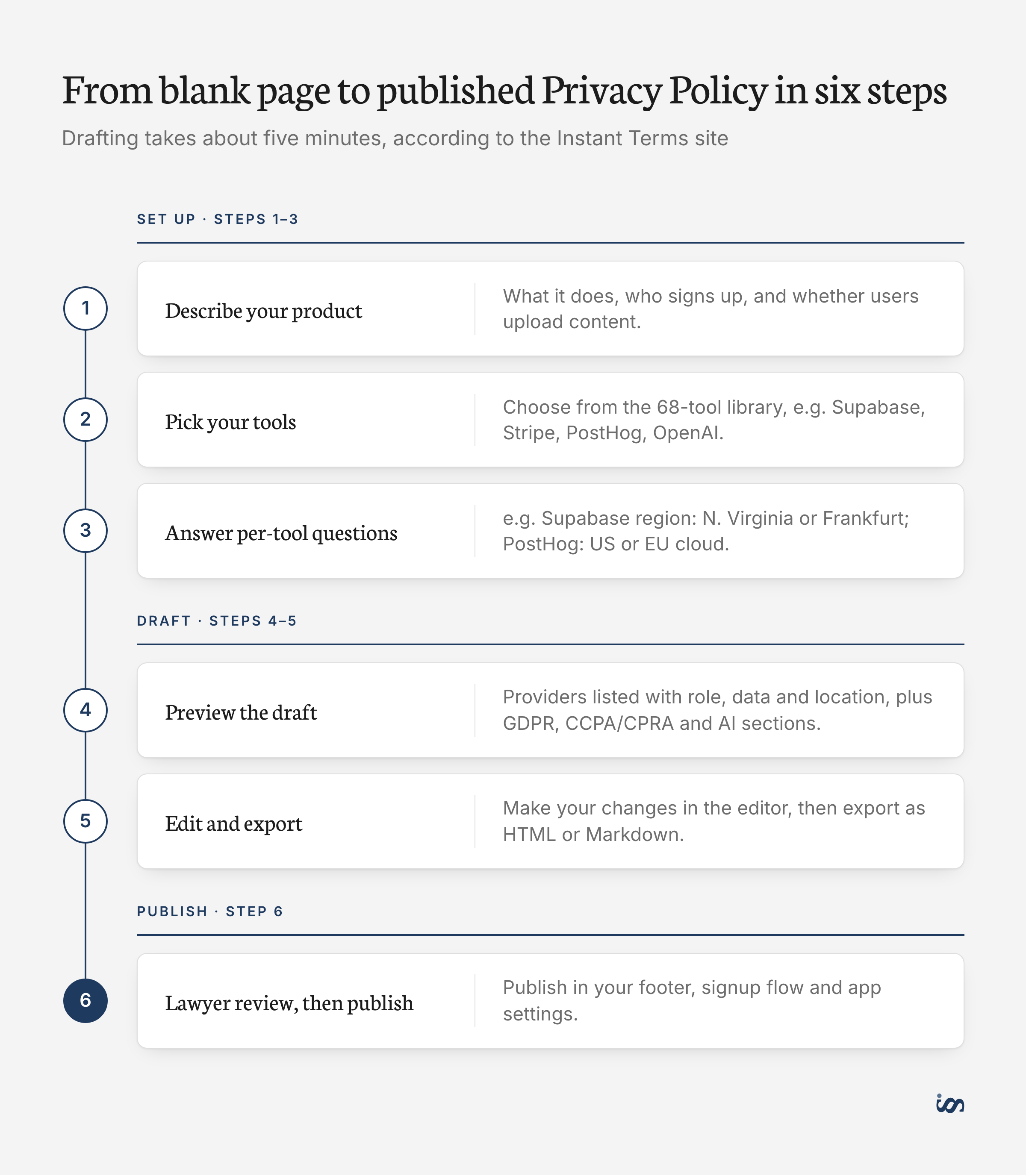
1. Describe your SaaS product
Your product description decides which general sections the draft starts from. The running example here is Acme Notes, the fictional sample product on the Instant Terms site. Drafting and previewing are free, with no card required.
Say what the product does, who signs up (individuals or business accounts) and whether users upload content. This separates the data you control, such as accounts, billing and analytics, from content you may process on behalf of business customers.
The difference matters. For site visitors and account holders, you are the controller. For content a business customer puts into your product, you are usually a processor. That relationship belongs in a DPA, not in the Privacy Policy. See a GDPR Article 28 DPA for your business customers. Termly's guide is one of the few top results that raises the processor role, and it does so in a single line.
2. Pick the tools your SaaS runs on
Every generic guide tells you to "list your third parties". None of them shows you how. The Instant Terms library has 68 tools in 12 categories. These include Hosting & infrastructure (10), Analytics (10), Email (8), Payments (7), Advertising & attribution (7) and AI models (4).
Each tool brings its own clauses, data categories and cookies. It also links to the vendor's privacy policy and DPA. As a result, the draft names the vendors you use rather than referring to "third-party service providers".
Acme Notes uses four tools:
- Supabase for its database, authentication and storage
- Stripe for payments
- PostHog for product analytics
- OpenAI for an AI feature
To find every vendor you use, check these places:
- Card statements and SaaS invoices
- Your package dependencies
- Your DNS and email-sending records
- Script tags on your marketing site
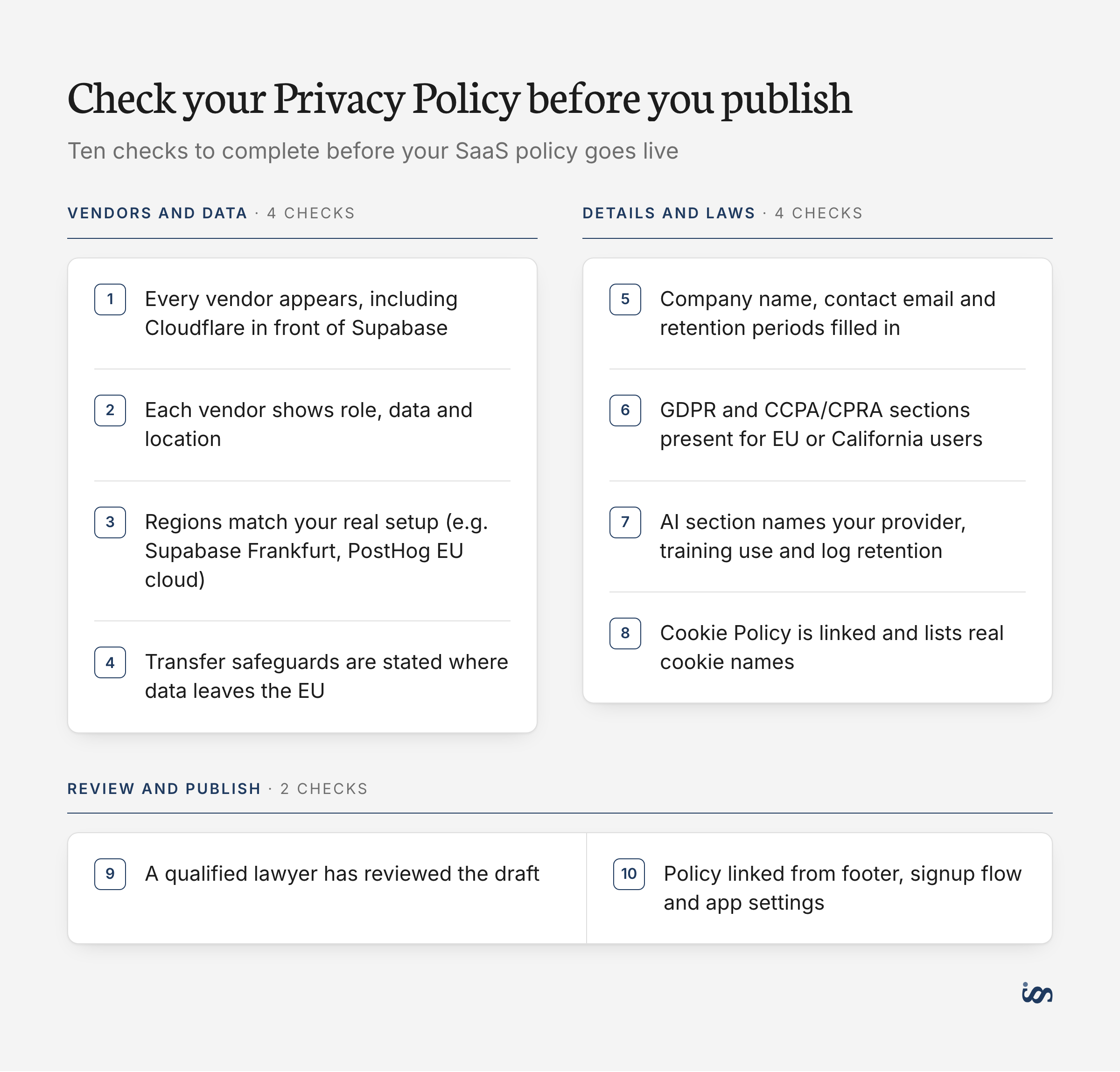
Then look for infrastructure you did not knowingly choose. One developer found Cloudflare in the request path of Supabase projects, shown by server: cloudflare and cf_* fields, and asked whether it is a named subprocessor. Check each vendor's current subprocessor list, such as Supabase's dated list. Vendors change their subprocessors, regions and terms, so always work from the current versions.
You can expect the usual SaaS data categories: identity, authentication, billing, telemetry, API keys and logs, and support data.
3. Answer the per-tool questions
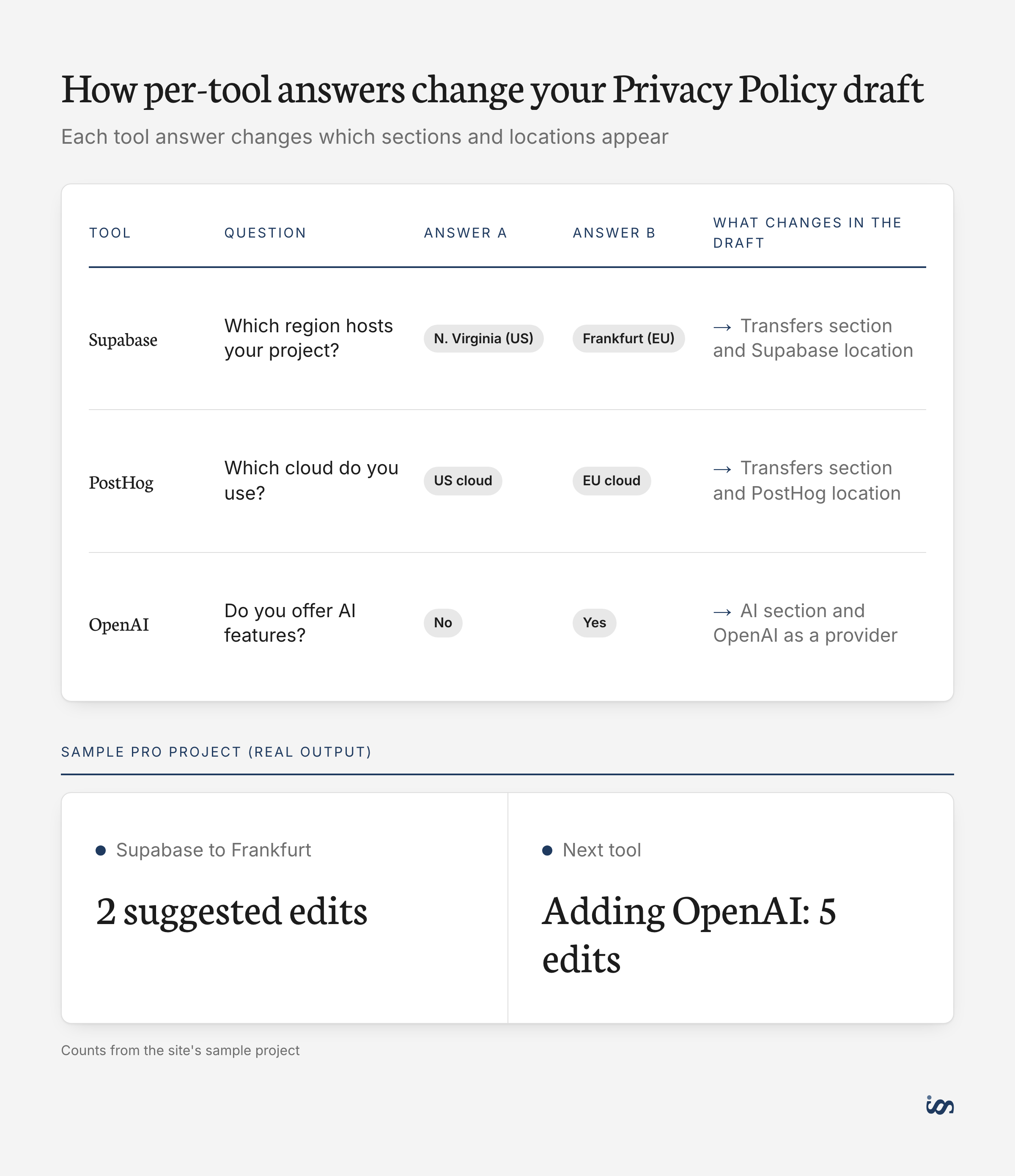
A few questions per tool change the wording of your policy. Which region hosts your Supabase project? Do you use PostHog Cloud in the US or the EU? Your answers shape the international transfers section so it matches your real setup.
Here is the background for Supabase. Its DPA names Supabase as the processor and you as the controller. It uses Standard Contractual Clauses (SCC) Module Two, which covers controller-to-processor transfers. It uses Module Three when you are a processor yourself.
The region is only part of the transfers picture. ComplyDog notes that Supabase may process data wherever it or its subprocessors have facilities. The clause number for this varies between DPA versions, so check the current one.
For more detailed wording, read these two posts:
- Supabase and GDPR: N. Virginia vs Frankfurt wording
- Privacy Policy wording for PostHog's US and EU cloud
Selecting OpenAI adds the AI section. PrivacyPolicyGen recommends three things for this section. Name the LLM provider. Say whether data is used for training. Give a retention period for logs.
4. Preview the Privacy Policy draft against your stack
Read the preview with your vendor list beside it. The aim is to catch gaps before you pay or publish.
Check that:
- Every service provider is listed with its role, the data it handles and its location.
- The GDPR and CCPA/CPRA sections are present if you have EU or California users.
- Your vendors appear by name. Article 13(1)(e) lets you name either recipients or categories of recipients. Naming the vendors is the more specific choice.
The CCPA covers businesses outside California if they meet its thresholds. The revenue threshold is reported as $26,625,000 for 2025–26. Some guides still say $25 million, so check the current figure at cppa.ca.gov.
CalOPPA has no revenue threshold. A pre-revenue SaaS with California visitors may still need a policy.
If your tools set cookies, the Privacy Policy should point to a Cookie Policy that lists them. Examples are Google Analytics' _ga, which lasts 2 years, and Stripe's __stripe_mid, which lasts 1 year, according to vendor documentation. See a Cookie Policy that lists your real cookies.
5. Edit what only you know, then export
A generator cannot know everything about your business. Edit these by hand:
- Your legal entity name and contact details
- How long you keep each kind of data
- Whether users must provide data, and what happens if they don't (an Article 13 item)
- Anything sensitive, such as health data
Also watch for three errors that are common in top-ranking guides:
- Consent is one of six GDPR lawful bases. It is not the default.
- SOC 2 is an audit framework, not a regulation.
- The "update at least every 12 months" rule comes from the CCPA. It does not apply everywhere.
Make your changes in the built-in editor, then export. The One-off plan lists HTML and Markdown as export formats. The Privacy Policy page also mentions Word and PDF. The One-off set costs $24 once per project and includes drafts of the Privacy Policy, Terms of Use and Cookie Policy.
Publish the policy in your footer, your signup flow and your app settings, as CookieYes suggests.
6. Have a qualified lawyer review your Privacy Policy before you publish
Instant Terms produces first drafts. It is not a law firm, and its drafts are not legal advice or a guarantee of compliance. Instant Terms recommends that a qualified lawyer reviews your documents before you publish them.
Bring your tool list and regions to the review. That way the lawyer can check the facts as well as the wording.
Ask the reviewer:
- Which laws apply, given where my users are?
- Are my lawful bases right?
- Are my retention periods defensible?
- Do I need a DPA for business customers?
After launch: keep your SaaS Privacy Policy in step with your stack
A policy goes out of date when your stack changes. Under GDPR Article 13(3), you must give people information about a new purpose before you process their data for it. Adding a vendor often introduces a new purpose. If the CCPA applies to you, you must also update the policy at least once every 12 months.
The Pro plan costs $11 per month. When you add a tool or move a region, Pro produces suggested edits as tracked changes, and your own edits are kept. Pro also includes version history. It also provides change notices with effective dates, drafted emails to users and a changelog.
The site's sample Pro project shows how many edits a change can trigger. These counts are labelled as real output:
- Adding Meta Pixel produced 6 suggested edits.
- Moving Supabase to Frankfurt produced 2.
- Adding OpenAI produced 5.
If you already have a policy, the free policy checker scores it and lists what is missing. You get 3 free checks a month with an account. To choose a plan, read whether One-off or Pro fits your launch.
FAQ
Can I create a privacy policy for my SaaS for free?
You can draft and preview in Instant Terms for free, with no card required, so you see the full draft before paying. Exporting the core three documents costs $24 once per project, or $11 per month on Pro. Free templates exist, but they describe a hypothetical company rather than the vendors you use.
Does Supabase's privacy policy cover my app's users?
No. Supabase's privacy policy excludes Customer Data and tells those people to read the customer's own privacy notice. You need your own Privacy Policy that names Supabase, its role and its region.
Do I need a lawyer to create a SaaS privacy policy?
Instant Terms produces first drafts and is not a law firm. It recommends that a qualified lawyer reviews your documents before you publish them. A draft built from your stack shortens that review, because the facts are already in place. The draft is not legal advice.
How often should I update my SaaS privacy policy?
Update it whenever you add a vendor, change a region or start using data for a new purpose (GDPR Art. 13(3)). If the CCPA applies to you, it also requires an update at least once every 12 months. That yearly rule comes from the CCPA and does not apply everywhere.
Do I need a separate Cookie Policy?
If your tools set cookies, such as Google Analytics' _ga or Stripe's __stripe_mid, a Cookie Policy keeps your Privacy Policy readable. It lists each cookie's name, purpose, category and duration. The One-off set includes a Cookie Policy draft. For more detail, see our post on building a Cookie Policy with your real cookies.
Your policy is only as accurate as the list of tools behind it, so start with that list. Write down what you run, where it runs and who you sell to. The rest of the draft builds on those facts. Vendors change their terms, regions and cookies, so check the current versions before you publish.
Drafts, not legal advice
Instant Terms is not a law firm and does not give legal advice. Everything it produces is a first draft based on your answers, and it may not cover every law or situation that applies to your product. We always recommend having a qualified lawyer review your documents before you publish them. You are responsible for the documents you use.