· 11 min read
Legal pages for mobile apps: iOS and Android guide
Legal pages for mobile apps, mapped to App Store and Google Play rules: Privacy Policy, Data safety, account deletion, ATT and when you need a custom EULA.

Short answer: the legal pages for mobile apps start with a Privacy Policy, linked in the store listing and inside the app, plus an account deletion route if users can create accounts. Every app also needs licence terms, which on iOS means Apple's Standard EULA by default or your own custom EULA. Your SDKs, permissions and payment model then decide what else you disclose: App Tracking Transparency (ATT), Play Data safety answers, a Refund Policy for in-app purchases and an Acceptable Use Policy for user content or AI features.
Why app reviewers care about your mobile app's legal pages
Your legal pages are one of several places where you describe what your app does. The stores expect those descriptions to agree.
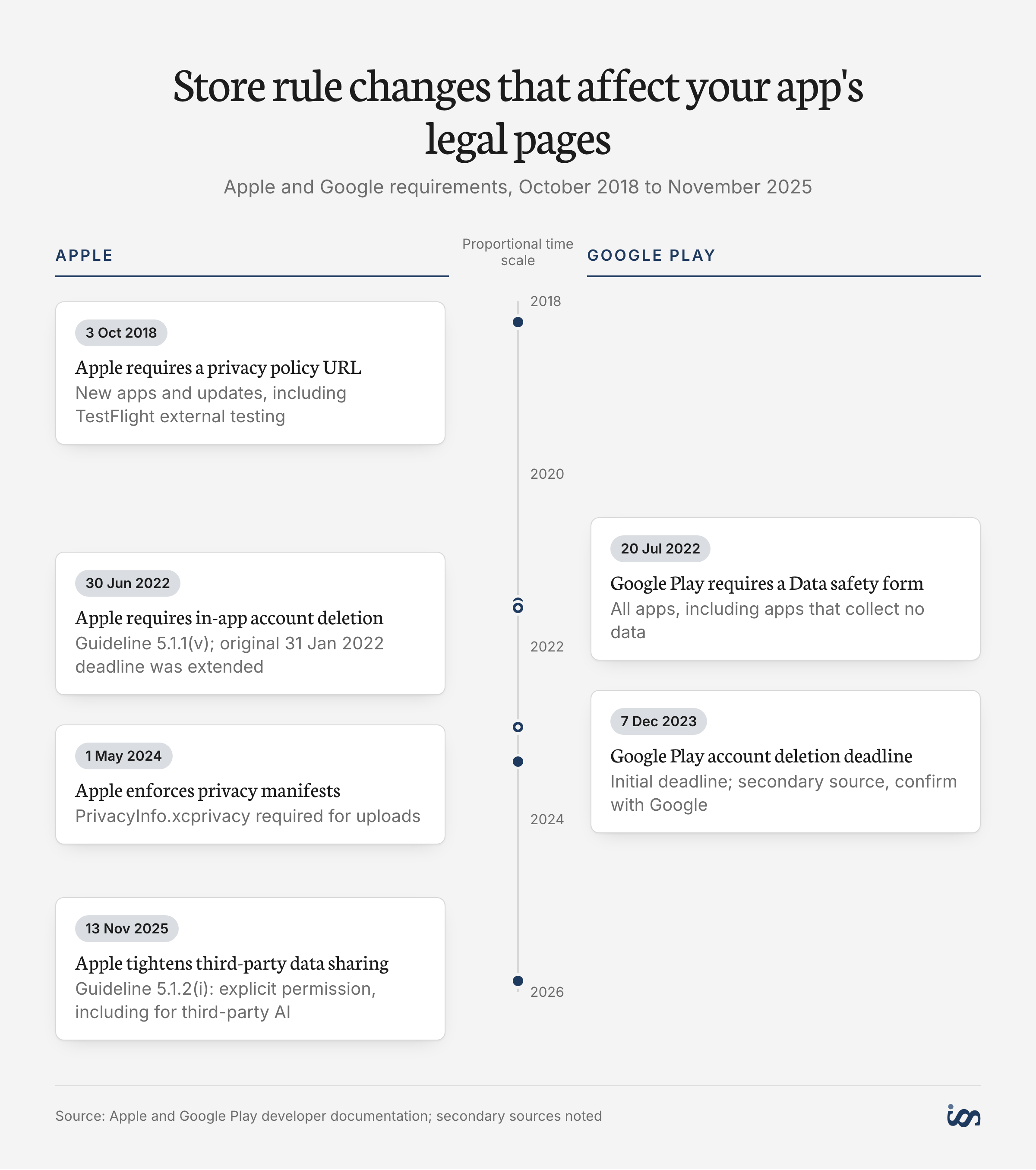
Apple has required a privacy policy URL in App Store Connect for all new apps and updates since 3 October 2018, including TestFlight external testing. Practitioners report that reviewers compare the policy with your App Privacy answers and the SDKs found in the binary (ptkd). That is what developers have observed, not a process Apple has published.
Google is more explicit. Developers are responsible for the accuracy of the Data safety form, and misrepresentation leads to enforcement.
StartSmart Counsel makes the same point from the legal side. Your terms and privacy policy "should not be treated as generic templates", because they have to match what the app does. A generic template is a rejection risk as well as a legal one.
The rules have also changed several times since most ranking articles were written.
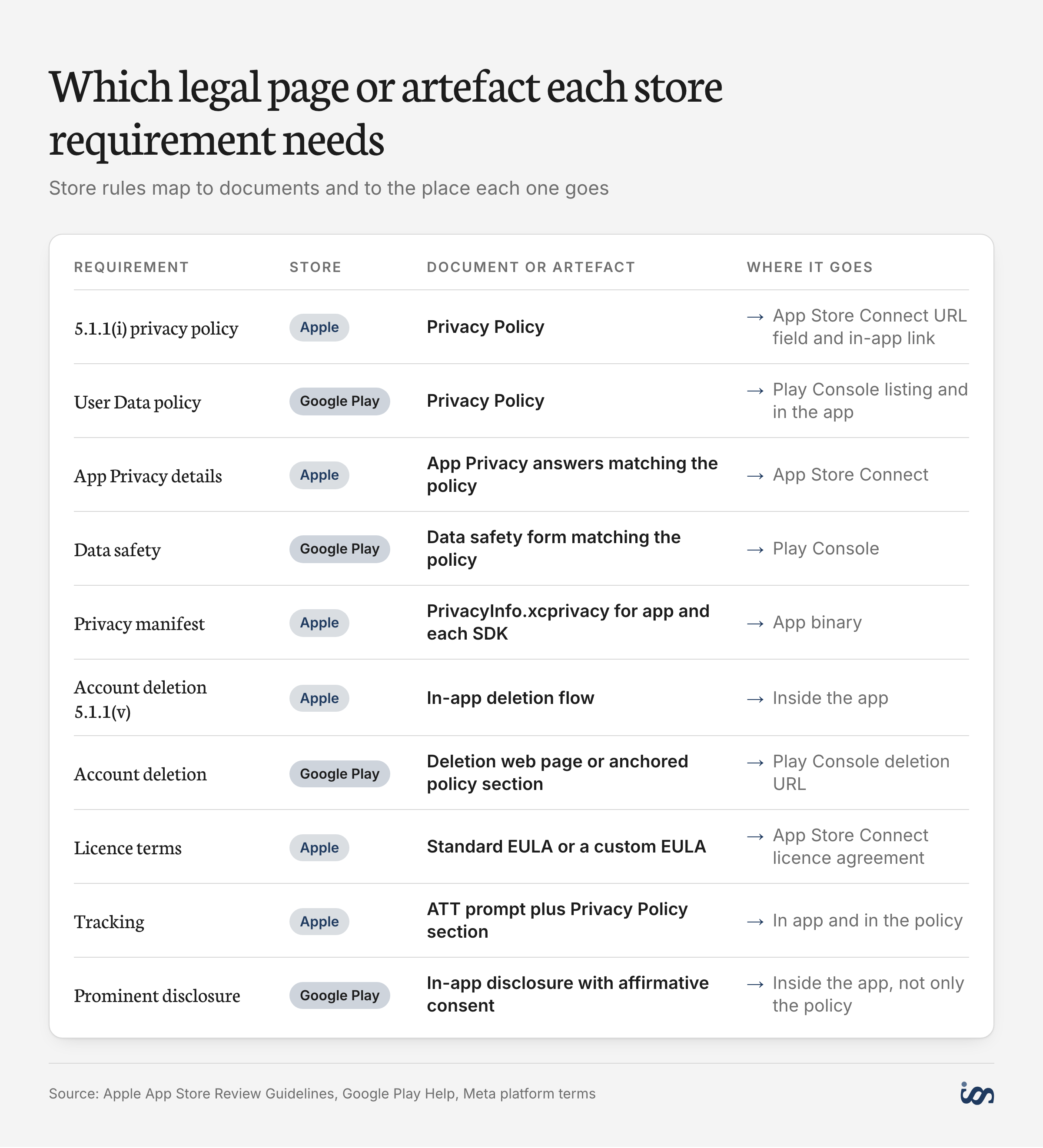
The map: each store requirement, the legal page that meets it and where it goes
Use the table below as the reference for the rest of this post. Each numbered section expands one or more rows.
One Privacy Policy usually serves both stores. Apple's App Privacy answers and Google's Data safety form are separate. They are not the policy, but they must agree with it.
Developers already work this way. Public GitHub repos such as this one host legal pages at public URLs, including a separate delete-account page.
Store rules change. Check the current guideline text before you submit.
1. Privacy Policy: what Apple and Google both ask for
Every app needs a Privacy Policy. Both stores ask for one, and neither accepts "we collect nothing" as a reason to skip it.
Apple's Guideline 5.1.1(i) asks for an easy-to-find link in the App Store Connect metadata and inside the app. The policy must say what data is collected, how it is collected and every use made of it. It must also confirm that third parties, including SDKs, protect the data to the same standard.
Google's User Data policy asks for a valid policy in the store listing and in the app. You disclose what you collect, how you use it and who you share it with.
Apps that access no personal or sensitive data must still submit a privacy policy. Apps targeting children must link it in the listing and the app, whatever data they access.
App policies also need to cover mobile-only data such as location, device IDs and camera, as the legalpolicygen FAQ notes.
Do not paste website terms into an app. Lawpath warns that app documents need to cover in-app purchases, auto-renewing subscriptions, push notifications and downtime.
Which privacy laws apply depends on your storefronts and users. Check that with a lawyer.
2. App Privacy labels, Data safety and privacy manifests must match the policy
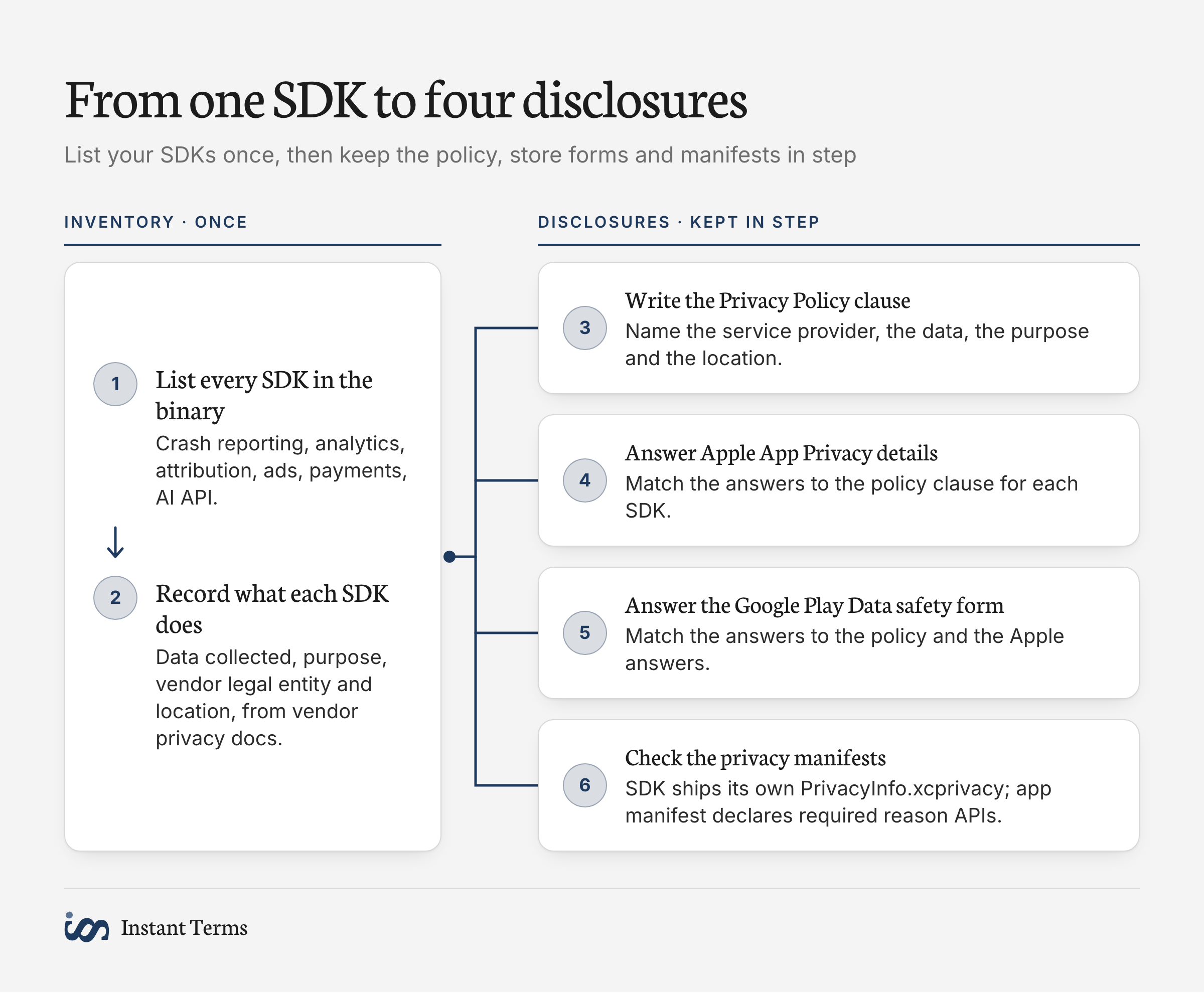
One SDK list feeds four separate disclosures. If any two disagree, a reviewer can find the mismatch.
On Google Play, all apps have had to complete the Data safety form since 20 July 2022, including apps that collect no data. The requirement covers closed, open and production testing tracks. For the detail, see how the Play Data safety form and your Privacy Policy must match.
On iOS, a privacy manifest is a property list named PrivacyInfo.xcprivacy. It records the data types collected and the "required reason APIs" used (dev.to). NSFileSystemFreeSize is one example. These APIs are limited to approved reasons, to prevent fingerprinting (WWDC23 session 10060).
Apple has enforced manifests for uploads since 1 May 2024. Third-party SDKs must ship their own manifests and cannot rely on yours.
Take an app with a crash reporter, an attribution SDK and an LLM API. Each needs a policy clause naming the vendor and what it receives. Each needs a matching App Privacy answer and Data safety answer. Each third-party SDK in the binary needs its own manifest, and your app's manifest covers your own code.
SDK vendors change what they collect and their terms. Treat every SDK update as a reason to re-check all four places.
If you already have a policy, the free policy checker scores it against the tools you pick and lists what is missing, from undisclosed tools to app store requirements. You get 3 free checks a month with an account.
3. Mobile permissions and prominent disclosure
Permissions are disclosed in three places: the operating system prompt, an in-app disclosure where needed, and the policy.
On Apple platforms, every permission request needs an Info.plist purpose string explaining why the app needs it (wishkit). Under Guideline 5.1.1(iv), apps "must respect the user's permission settings and not attempt to manipulate, trick, or force people to consent."
Google adds the prominent disclosure rule. When data use goes beyond what users would reasonably expect, such as background location, the disclosure must sit inside the app. It cannot live only in the policy or terms, and it needs affirmative consent (Google Play Help).
Your Privacy Policy should list each permission, what it is used for and what happens if the user declines. For wording, see example clauses for disclosing mobile permissions.
4. Tracking and attribution SDKs: ATT, CCPA 'sharing' and third-party AI
Some SDKs change the legal pages, not just the code. Attribution, advertising and AI SDKs are the ones to look for.
Apple lets you add consent screens that the law requires. You must still respect the user's App Tracking Transparency answer (Apple).
Attribution SDKs such as AppsFlyer raise ATT and CCPA/CPRA "sharing" questions. Both get their own posts: what to disclose about App Tracking Transparency and whether attribution SDKs count as 'sharing' under the CCPA/CPRA.
Apple's 13 November 2025 update to Guideline 5.1.2(i) adds a newer rule. Apps must disclose and get explicit permission before sharing personal data with third parties, including third-party AI (AppFollow's summary). Verify the exact wording against Apple's guidelines. The rule matters most for apps that send user input to LLM APIs.
In practice, your Privacy Policy names the AI provider and says what is sent. The app asks for permission before the first send.
Vendors change their terms, data regions and SDK behaviour. Check their current documentation.
5. The account deletion page
Account deletion is a legal page in its own right, and the two stores want different things from it.
Apple's Guideline 5.1.1(v) has applied since 30 June 2022. Apps that support account creation must let users start deletion inside the app. The option must be easy to find, and temporary deactivation is not enough. Apps using Sign in with Apple must revoke tokens through the Sign in with Apple REST API.
Guest accounts that the app creates automatically are covered. Apps where sign-up happens in a browser still need in-app deletion. Apps in highly regulated industries, such as banking or healthcare, may handle deletion through customer service.
Google wants a readily discoverable way to start deletion outside the app, with its URL entered in Play Console. Steps such as cancelling a subscription first must be explained. If the instructions sit inside your Privacy Policy, that section must be prominent, for example reachable by an anchor link (Google Play Help).
Users can also choose to delete some data without deleting the whole account.
Your deletion page should say:
- How to start deletion in the app and on the web.
- What is deleted, and what is retained and why.
- Any subscription step. Apple and Google subscriptions are cancelled in the store, not by you.
- How to request partial data deletion.
"Email us to delete your account" on its own does not meet Apple's in-app initiation rule.
6. Licence terms: Apple's Standard EULA, a custom EULA or your own Terms of Use
Apps are "licensed, not sold". Apple's Standard EULA applies unless you supply a custom EULA. Apple is a third-party beneficiary of either.
If you write your own, the Apple Developer Program License Agreement says it must include, and not contradict, Apple's minimum terms. It must also comply with law in every region where the app is distributed. The EULA is between you and the end user only.
One required clause, in plain words: if the app fails a warranty, the user can notify Apple for a refund of the purchase price, and Apple has no other warranty obligation (Muckle LLP).
When might you need your own terms? Consider it if your app has accounts, auto-renewing subscriptions, user-generated content or AI output. The Standard EULA is Apple's generic licence and does not describe those product-specific rules. Treat that as a decision factor, not a legal conclusion. A decision table for Apple's standard EULA versus a custom EULA walks through it.
Google Play has no Apple-style standard EULA to fall back on in our research. Android apps publish their own licence terms or Terms of Use. Terms of Use, terms and conditions and terms of service are interchangeable names.
The Instant Terms EULA generator drafts a custom EULA with the terms Apple requires, Google Play terms, and clauses for in-app purchases and updates. It is a first draft for a qualified lawyer to review, not legal advice.
7. Pages that depend on what your app sells or does
Tick off the pages below that apply to you.
Refund Policy. Apple and Google handle in-app purchase refunds, so your policy should send users to them. The EU and UK 14-day right of withdrawal still needs explaining.
Acceptable Use Policy. This applies when users upload content or the app offers AI features. It sets content standards for uploads and rules against AI misuse.
Cookie Policy. Native apps do not set browser cookies. SDK identifiers raise similar consent questions, which ATT and the Privacy Policy handle. Webviews and a companion website do set cookies, such as Google Analytics' _ga (2 years) and Stripe's __stripe_mid (1 year), and a Cookie Policy covers those. This is practical reasoning, not a legal rule. Vendors change their cookies, so check current names and durations.
Meta APIs. Apps that use them need both a privacy policy and terms of service.
Other rules may apply, such as EU trader information, Apple's subscription disclosures in Guideline 3.1.2 and children's privacy law. This post does not cover them. Check them with a lawyer.
8. One set of legal pages for your app and website
A single Privacy Policy and Terms of Use can serve both web and app. They need the app-only sections: permissions, push notifications, in-app purchases, account deletion and SDKs.
Lawpath's warning applies again. Website-only terms miss in-app purchases, auto-renewal and push notification consent.
Host the pages at stable public URLs. If a store console field points to a page that has moved, review can fail on it.
Drafting your mobile app's legal pages from your SDK list
Your documents must match your binary, so Instant Terms starts from your stack. You pick the services your app runs on from a library of 68 tools. Each tool brings its own clauses, data categories, vendor legal names and links to the vendor's privacy policy and DPA. Per-tool questions, such as data regions, change the wording.
The Privacy Policy draft adds the App Tracking Transparency, mobile permission, GDPR, CCPA/CPRA and AI sections that apply to you. The EULA draft includes Apple-required and Google Play terms. The Refund Policy routes in-app purchases to Apple and Google. For an attribution SDK, see the AppsFlyer tool page. For the full walkthrough, read drafting a mobile app Privacy Policy from your SDKs and permissions.
Drafting and previewing are free, with no card required. The One-off set costs $24 once per project and covers Privacy Policy, Terms of Use and Cookie Policy drafts. Pro costs $11 a month and turns tool changes into suggested edits shown as tracked changes.
Instant Terms produces first drafts. It is not a law firm, and it recommends that a qualified lawyer reviews your documents before you publish. Store approval is not guaranteed.
FAQ
Do I need a privacy policy if my app collects no data?
On Google Play, yes. Even apps that access no personal or sensitive data must submit one (Help 9859455), and all apps must complete the Data safety form. Apple requires a privacy policy URL for all new apps and updates. Say what you do not collect, and remember that SDKs may collect data even if your code does not.
Can I use the same legal pages for my website and my app?
Usually, yes, if the documents add the app-specific sections: permissions, push notifications, in-app purchases, SDKs and account deletion. Do not copy website-only terms unchanged, as Lawpath advises.
Does a mobile app need a Cookie Policy?
A native app does not use browser cookies. If your app has webviews or a companion website, those set cookies such as _ga, and a Cookie Policy covers them. Tracking through SDK identifiers is handled through ATT and the Privacy Policy instead.
Where does the privacy policy link go?
On iOS, it goes in the App Store Connect privacy policy URL field and inside the app. On Android, it goes in the Play Console store listing and inside the app. The Play account deletion URL is a separate Play Console field.
Is "email us to delete your account" enough?
Not for Apple. Since 30 June 2022, users must be able to start deletion inside the app, apart from limited exceptions for highly regulated industries. Google needs a discoverable web route whose URL is entered in Play Console. An email address alone is unlikely to meet either rule, so check the current guideline text.
Write down your SDK list before you write any legal page. It is the part reviewers check, and it is the part that changes. Each time it changes, update the policy, the store forms and the manifests together, and have a lawyer read the result before you submit.
Drafts, not legal advice
Instant Terms is not a law firm and does not give legal advice. Everything it produces is a first draft based on your answers, and it may not cover every law or situation that applies to your product. We always recommend having a qualified lawyer review your documents before you publish them. You are responsible for the documents you use.